HEGERLS Warehouse Automation Solutions & High-Density Storage Systems

 read
read Warehouse automation uses software, data-capture tools and material-handling equipment to move, store, pick, track and ship goods with less repetitive manual work. It may begin with barcode scanning and a warehouse management system (WMS), then expand to conveyors, shuttles, stacker cranes, mobile robots or a connected automated storage and retrieval system (AS/RS). The right level depends on your inventory, throughput, building, existing systems and budget—not on buying the most machines.
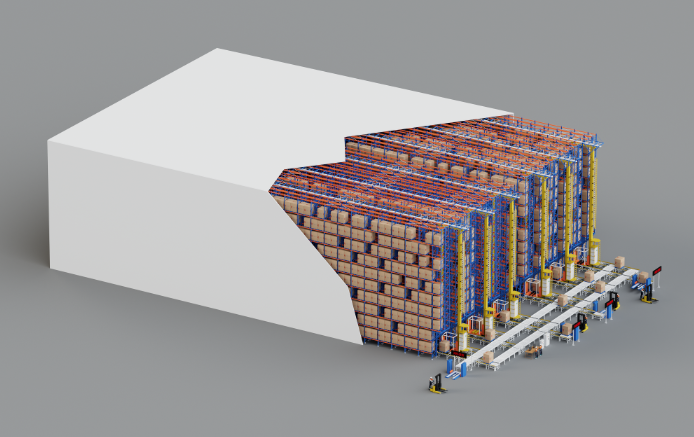
Think of automation as a connected chain rather than a single robot.
● Identify: Barcodes, RFID or other data-capture tools identify an item, pallet or location.
● Decide: A WMS assigns inventory, locations and warehouse tasks based on operating rules.
● Coordinate: Where automated equipment is involved, a WCS or control layer turns tasks into equipment movements and manages status or exceptions.
● Execute: Conveyors, shuttles, stacker cranes, lifts, AGVs, AMRs or operators move and handle the goods.
● Confirm: Each completed step updates inventory and order status, giving the next process reliable information.
A gap anywhere in that chain matters. A fast shuttle cannot correct the wrong pallet dimensions, and a sophisticated WMS cannot compensate for unreadable location labels. Good automation starts with dependable process and inventory data.
Automation can support part or all of the material and information flow:
Not every step needs the same level of technology. Barcode scanning may solve a traceability problem, while a high-volume storage operation may need mechanised transport and automated retrieval. The useful question is not “Can we automate this?” but “Which constraint are we trying to remove?”
Digital automation replaces paper, spreadsheets or disconnected updates with structured data and system-directed work. Common tools include barcode scanning, RFID, mobile devices, WMS software, voice direction and pick-to-light systems.
This is often the sensible starting point because physical equipment depends on reliable item, location and transaction data.
Conveyors provide repeatable movement between defined points. Sortation systems identify and route cartons, totes or parcels to the correct destination.
They work well where the flow is stable and frequent. They are less flexible when routes, order profiles or layouts change often, so capacity and expansion need to be planned early.
AS/RS stores and retrieves pallets, totes or cartons from designated locations. The category includes stacker-crane systems, shuttle-based systems, vertical lift modules and other goods-to-person configurations.
The design must match the load unit, inventory depth, warehouse height, required throughput and redundancy plan. A pallet operation and a small-parts operation should not be evaluated using the same equipment assumptions.
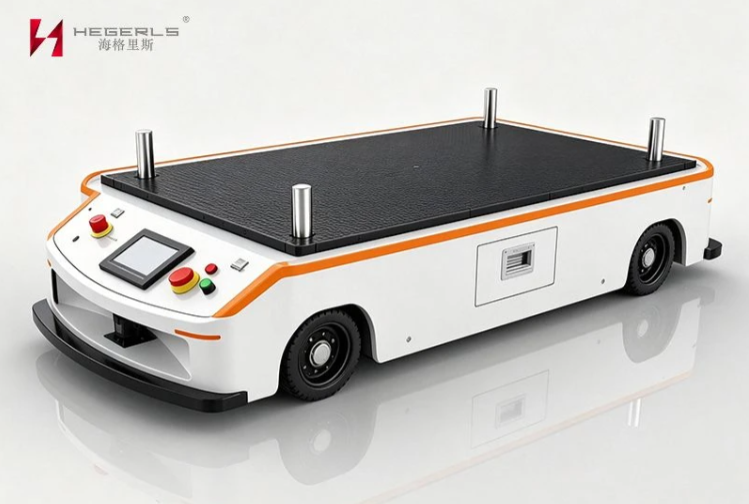
Automated guided vehicles (AGVs) usually travel along predefined routes. Autonomous mobile robots (AMRs) use onboard navigation to move more flexibly around a facility.
Both can reduce routine transport, but route congestion, charging, traffic control, floor conditions and interaction with people still require engineering attention.
Pick-to-light, voice picking and goods-to-person systems help operators find or receive the correct item with less walking and searching. These options can be valuable where picking—not storage—is the main constraint.
The best choice depends on SKU count, order lines, item characteristics, peak volume and the level of process change the team can absorb.
When the system is matched to the operation, warehouse automation can support:
These are potential outcomes, not automatic promises. Results depend on the baseline, design, data quality, operating discipline and how performance is measured after launch
Warehouse automation can fail even when the equipment works as specified. Common causes include:
Automation deserves a closer look when one or more of these problems persist:
Before buying equipment, walk the process from receiving to shipping. Record volumes, exceptions, queues and manual handoffs. A clear bottleneck gives the project a purpose; a vague goal such as “becoming smarter” does not.
Choose a specific issue—such as retrieval time, picking capacity, inventory accuracy or space—and document current performance. This baseline will later show whether the change worked.
Collect SKU and inventory profiles, order lines, inbound and outbound volumes, seasonality, pallet or tote dimensions, weights and exception rates. Use both average and peak figures.
Confirm clear height, column grid, floor or foundation conditions, fire-safety constraints, temperature, docks, staging space and available power. Map interfaces with the ERP, WMS and current equipment.
A shuttle system, stacker-crane AS/RS, conveyor route or mobile-robot fleet may solve different versions of the same problem. Compare capacity, flexibility, redundancy, expansion and operator involvement—not headline speed alone.
Where practical, test a defined process or area first. A phased launch gives the team time to validate data, interfaces, training and exception handling before adding more equipment.
Include design, software, equipment, integration, installation, training, maintenance, energy, spare parts and expected downtime. A basic comparison can use:
Payback period = total project investment ÷ estimated annual net benefit
The estimate should state its assumptions. After launch, track the same measures used in the baseline and adjust the process as operating conditions change.
No. A WMS manages inventory and workflows; warehouse automation also includes data-capture tools, controls and physical equipment.
No. Many warehouses automate only the processes that create the greatest bottlenecks or risks.
Costs vary by layout, software, integration, load type, capacity, equipment and service scope. Accurate estimates require project data.
Prepare your layout, clear height, load dimensions and weights, SKU profile, inventory, throughput, temperature, current software and timeline.
There is no universal best option. The system must fit your loads, workflow, capacity, building, budget and future plans.
HEGERLS works on warehouse automation projects involving warehouse racking systems, four-way pallet shuttles, pallet shuttle solutions, stacker-crane AS/RS, conveyors and WMS/WCS coordination. The configuration for each project depends on an engineering review rather than a standard equipment bundle.
Not sure how to compare equipment suppliers and system integrators? Follow this warehouse automation manufacturer selection guide before requesting competing proposals.
If you are planning a new facility or upgrading an existing warehouse, send us your layout and clear height, load-unit dimensions and weights, SKU and inventory profile, average and peak throughput, temperature conditions, current software and target timeline. The HEGERLS team can use these inputs to discuss a suitable concept, technical requirements and quotation scope through the project enquiry page.


