HEGERLS Warehouse Automation Solutions & High-Density Storage Systems

 read
The four commonly cited types of warehouse management system are standalone WMS, WMS modules inside enterprise resource planning systems, WMS modules within broader supply-chain suites, and cloud-based WMS. They differ in functional scope, integration model, ownership and deployment.
This classification needs one qualification: the categories are not always mutually exclusive. A standalone, ERP or supply-chain WMS can also be delivered in the cloud. Buyers should therefore evaluate two separate questions—what the system covers and where it runs.
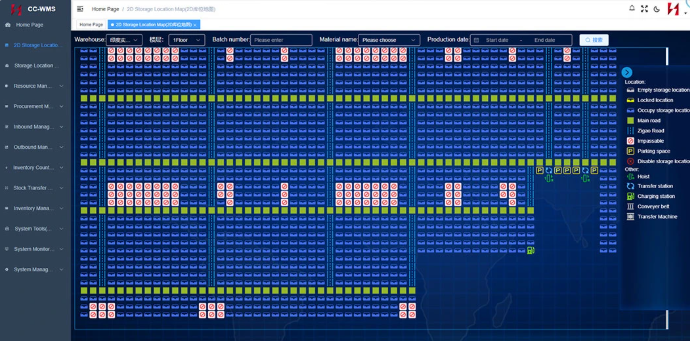
HEGERLS CC-WMS interface showing a two-dimensional storage-location map
|
WMS type |
Main characteristic |
Typical advantage |
Main evaluation point |
|
Standalone WMS |
Dedicated warehouse application |
Deep warehouse functionality |
Interfaces with ERP, TMS, ecommerce and automation |
|
ERP-integrated WMS |
Module within an ERP environment |
Shared business platform and master data |
Depth of warehouse workflows and upgrade constraints |
|
Supply-chain-suite WMS |
Part of a wider execution or planning suite |
Coordination across several logistics functions |
Scope, licensing and dependence on one ecosystem |
|
Cloud WMS |
Vendor-hosted software accessed over a network |
Reduced local infrastructure and managed updates |
Connectivity, security, configuration and subscription terms |
A standalone WMS is purpose-built for warehouse execution. Typical workflows include receiving, putaway and inventory management, followed by replenishment, allocation, picking, packing, counting, transfers and shipping. More advanced products may add labour, slotting, yard or automation functions.
The main strength is warehouse depth. The main responsibility is integration. Purchase orders, sales orders, item data and status usually move between the WMS and ERP, order platform, carrier software or other systems.
A standalone option suits operations whose processes are more complex than the warehouse module available in their existing business software. During selection, confirm API or message support, data ownership, error handling, upgrade responsibility and the internal team needed to maintain the interfaces.
An ERP-integrated WMS is delivered as a module within the same platform that manages purchasing, sales, finance, production or other enterprise processes. Its main attraction is a shared environment for business transactions and master data.
This can reduce some interface boundaries, but it does not eliminate process design. The warehouse still needs location rules, task confirmation, permissions and exception handling. The depth of these functions varies widely between products and editions.
This model may fit companies that already operate a strategic ERP platform and have moderate warehouse complexity. Test real receiving, picking, counting, batch, expiry and automation scenarios rather than assuming the module covers them because it carries the ERP brand.
A supply-chain-suite WMS is part of a broader platform that may also include order management, transportation, labour, yard, planning or execution functions. The intended benefit is coordination beyond the warehouse walls.
This approach can suit multi-site distribution networks, 3PLs and organisations that want several logistics functions within one vendor ecosystem. It can also introduce additional scope, licensing and governance requirements.
Buyers should define which modules are required now, which are optional, how data is shared and whether functions can be added without reimplementation. A broad suite is not automatically the best fit for a single warehouse with a well-defined need.
A cloud WMS is hosted by the provider or its infrastructure partner and accessed through a network, commonly under a subscription model. The provider typically manages the application environment and update cycle, while the customer manages configuration, users, data quality and operational adoption.
Cloud delivery can reduce local server responsibility and support remote access or multi-site rollout. It also makes network resilience, data residency, identity management, release testing, service levels and exit arrangements important procurement questions.
Define deployment and integration responsibilities before committing to hosting or service terms. Cloud does not describe functional depth. A lightweight inventory application and an enterprise WMS can both be cloud products. Compare the warehouse processes first, then assess deployment.
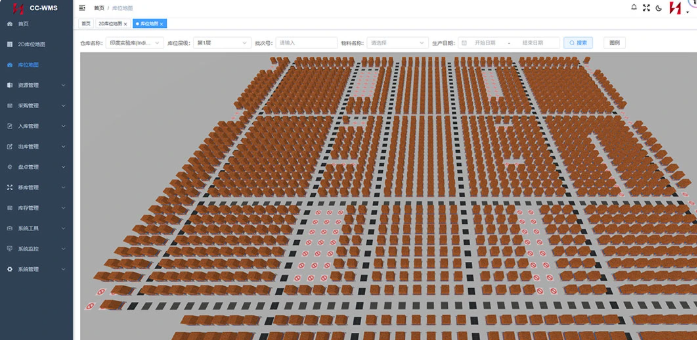
HEGERLS CC-WMS interface with a three-dimensional warehouse storage-location view
The common four-type list mixes three scope categories with one deployment category. A clearer decision matrix for warehouse management software uses two axes:
● Scope: inventory software with warehouse features, standalone WMS, ERP module or supply-chain suite.
● Deployment: cloud/SaaS, private cloud, hosted environment or on-premise infrastructure.
For example, a standalone WMS may be offered as SaaS or installed on customer infrastructure. An ERP module may also run in the cloud. Keeping these choices separate prevents a buyer from comparing unlike options.
Start with process complexity rather than company size. Document locations, units of measure, batches, serial numbers, owners, expiry rules, picking methods, returns and automation interfaces.
Then compare:
● Functional fit: Can the system execute normal and exception workflows?
● Integration: Which systems own orders, inventory, item data and confirmations across the warehouse automation layers?
● Configuration: Can rules change without extensive custom code?
● Deployment: Who manages infrastructure, releases, backups and security?
● Scalability: Can it support peaks, added sites, users and equipment?
● Implementation: What data, testing, training and cutover effort is required?
● Lifecycle cost: Include licences, subscriptions, integration, support and upgrades.
HEGERLS CC-WMS is presented for receiving, putaway, inventory, picking, counting, transfers and shipping. Its exact deployment, modules and interfaces should be confirmed in the project scope rather than inferred from a general WMS category.
Any WMS used with automated equipment must exchange reliable tasks and status messages. The WMS manages inventory and business rules, while a control layer such as HEGERLS YUNTU-WCS coordinates equipment execution.
Evaluate task creation, priorities, acknowledgements, duplicate messages, failures and recovery. A cloud deployment also needs a clear response to network interruption. System boundaries should be tested with representative equipment and exceptions before go-live.
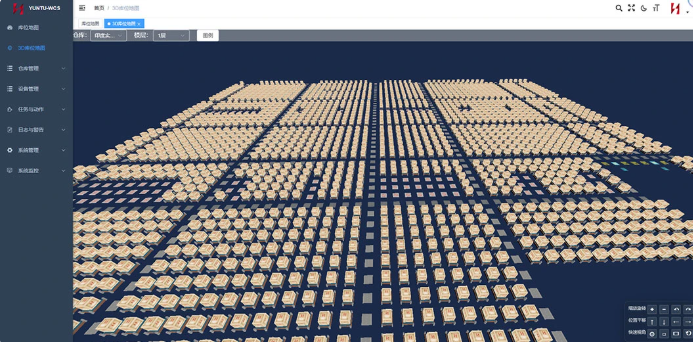
HEGERLS YUNTU-WCS interface showing a three-dimensional storage grid
No. Standalone, ERP and supply-chain-suite categories describe scope, while cloud describes deployment, so combinations are common.
No. Hosting may be simpler, but data preparation, process design, integrations, testing and training are still required.
It may be sufficient for moderate workflows, but detailed location, picking, traceability and automation requirements must be tested.
The best fit is the option that supports the required workflows and reliable WCS or equipment interfaces; category alone does not decide this.
Yes, but migration can affect data, integrations, procedures and training. Plan ownership and export requirements before selecting a platform.
Prepare your warehouse processes, item and location data, user roles, peak volumes, existing ERP or MES, equipment interfaces and deployment requirements. Send them through the HEGERLS project enquiry page for a project-specific scope discussion.