HEGERLS Warehouse Automation Solutions & High-Density Storage Systems

 read
read A warehouse management system, or WMS, is software that controls inventory locations and operational work inside a warehouse. It converts receipts and orders into tasks, guides people or connected systems through those tasks, and records each confirmed movement from receiving to shipping.
Unlike a basic stock list, a WMS answers three practical questions: what inventory is available, exactly where it is stored, and what should happen next. The HEGERLS CC-WMS Warehouse Management System covers functions such as receiving, putaway, inventory control, picking, counting, transfers and shipping. The final project scope depends on the agreed modules, interfaces and operating rules.
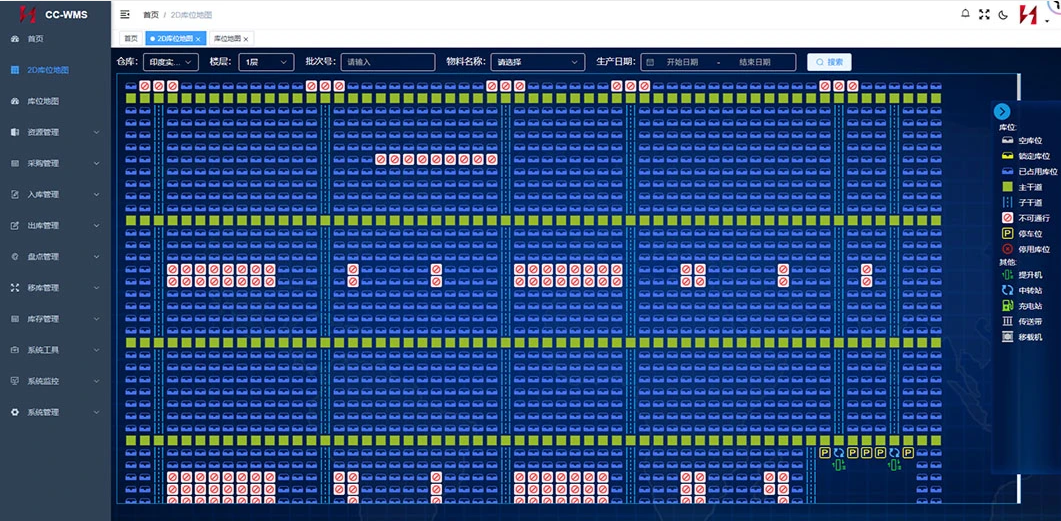
HEGERLS CC-WMS Warehouse Management System
A WMS provides a controlled record of goods and work inside the facility. The exact feature set varies, but common functions include:
| Warehouse stage | What the WMS manages |
| Receiving | Expected receipts, item identification, quantities, status and discrepancies |
| Putaway | Location rules, available capacity and destination tasks |
| Storage | SKU, batch, serial, owner, status, quantity and location history |
| Replenishment | Movement from reserve storage to picking locations |
| Picking | Order allocation, task priority, pick method and confirmation |
| Packing and shipping | Order checks, staging and dispatch confirmation |
| Counting and transfers | Cycle counts, adjustments and controlled location changes |
| Users and reports | Permissions, activity records, alerts and operating reports |
This is more than recording a total stock quantity. A WMS links inventory to specific locations and requires movements to be confirmed, usually through barcode or RFID identification, a mobile terminal, a workstation or an automated interface.
Most WMS workflows follow the same task-and-confirmation loop.
● The WMS receives a purchase order, sales order, transfer request or manually entered instruction.
● It applies configured rules for status, location, priority, allocation and handling.
● It creates a task for an operator, workstation or connected control system.
● The user or equipment confirms the completed movement.
● The WMS updates inventory, location and task history, then sends the required status to other systems.
For inbound goods, the process begins by matching the delivery with the expected receipt. Once the load is identified and checked, the WMS creates a putaway task based on configured location rules. The confirmed putaway establishes where the inventory is stored.
For outbound orders, the WMS checks available inventory, applies allocation rules and releases picking or replenishment tasks. Picking confirmation reduces inventory at the source location. Packing and dispatch confirmations complete the warehouse workflow and can return status information to the ERP or order platform.
Exceptions such as short receipts, damaged goods, blocked locations, stock differences and interrupted interfaces also need clear rules, permissions and tested recovery steps.
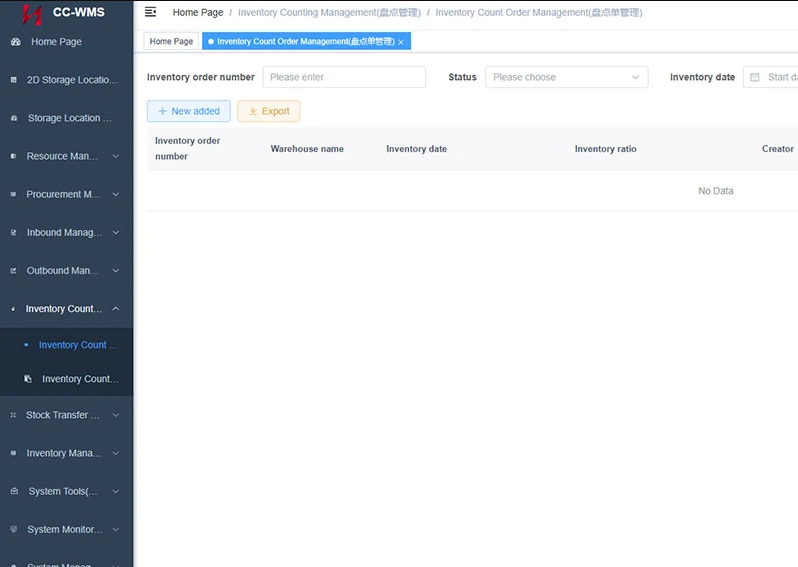
Details of the WMS Backend Interface
WMS types can be classified in two ways.
By functional scope, a company may use warehouse features inside an inventory application, a standalone WMS, an ERP module, or a broader supply-chain suite. A full WMS is relevant when location control, task methods, traceability or automation interfaces exceed simpler stock software.
By deployment, the system may be cloud-based or installed on company infrastructure. This affects hosting, updates, security, integrations and cost, but does not determine the functional fit.
| System | Main role | Typical responsibility |
| Inventory software | Records stock availability | Quantities, valuation, reorder points and basic locations |
| ERP | Manages wider business transactions | Purchasing, sales, finance and enterprise master data |
| WMS | Manages warehouse inventory and work | Locations, receiving, allocation, picking, counting and shipping |
| WCS | Coordinates automated equipment | Device tasks, routes, status, alarms and recovery |
These boundaries vary by solution. Before implementation, define which system owns item data, orders, inventory status, task priority, equipment status and final confirmation.
In an automated facility, the WMS decides what inventory movement is required. A control layer such as HEGERLS YUNTU-WCS coordinates how conveyors, shuttles, lifts or stacker cranes execute the task. A WMS can also direct people in a manual warehouse without a WCS.
A full WMS becomes relevant when basic tools can no longer control locations and work reliably. Warning signs include searching for goods, unrecorded movements, several picking methods, complex batch or expiry rules, multiple owners or sites, count differences, and automation plans.
Warehouse size alone is not the deciding factor. Process complexity, traceability requirements, order profile, growth plans and the cost of present errors provide a better basis for selection.
Automation requires reliable task and inventory data. The WMS records which load is available and what movement is needed; the WCS and equipment execute the physical movement and return status messages.
For example, automated storage systems may receive storage and retrieval requests from the WMS while a control system coordinates the equipment. The interface design should cover load identity, source and destination, task priority, message timing, failed-task handling and manual recovery.
Start with real workflows rather than a feature checklist. Document each process, exception, approval point and manual workaround from receiving through shipping.
Then confirm the following:
● Data requirements: items, units, locations, batches, serial numbers, owners, status and expiry rules.
● Operating rules: allocation, rotation, replenishment, picking, counting and adjustment controls.
● Integrations: ERP, MES, ecommerce, carrier platforms, scanners, printers, WCS and automated equipment.
● Governance: user roles, permissions, audit history, reporting, backups and change control.
● Testing: representative orders plus shortages, damaged goods, unavailable locations, count differences and interface interruptions.
● Delivery: data preparation, configuration, acceptance testing, training, cutover and support responsibilities.
HEGERLS includes software integration, commissioning and training within its warehouse automation services. However, each proposal and contract should state the exact modules, interfaces, testing criteria and deliverables for the project.
In logistics, WMS stands for warehouse management system, the software used to manage inventory locations and operational tasks inside a warehouse.
No. An ERP manages broader business transactions, while a WMS controls warehouse inventory, locations and floor-level workflows in greater detail.
Yes. A WMS can guide operators using scanners, mobile terminals or workstations in a manual or partly automated warehouse.
Typical inputs include item, unit, location, inventory, supplier, customer, order, batch and user-role data, together with workflow and interface rules.
Test complete inbound, inventory and outbound processes, including exceptions, permissions, integrations, reporting and recovery after an interrupted task.
Prepare your warehouse layout, SKU and inventory profile, inbound and outbound processes, order volumes, user roles, traceability rules, existing business systems, automation equipment and required reports.
Send these inputs through the HEGERLS project enquiry page so the software scope, interfaces and implementation responsibilities can be reviewed against the actual operation.

